





SPRY Mine Scheduling System

SPRY Mine Scheduling System

Modern mine scheduling and haulage has never been faster, more powerful or more intuitive. Reduce costly waiting time with some of the most advanced mining software in the world. Spry is suitable for open-cut or underground across multiple commodities, with the ability to accept all modern mine planning data packages.

Powerful Reporting and
 Analysis Tools

3D visualitation

Perform mine scheduling and haulage 3D visualisation with animation outputs without compromising quality or speed.

Fully customisable

Produce fully customisable haulage cost & revenue modelling to compare and optimise your mine plans.

Competitive price

Enjoy competitive pricing and a convenient licensing structure.

Hight accuracy

Utilise the optimised, multi-core 64-bit architecture in order to process the largest mine sites with the highest accuracy.

Automated

Plan automated stage generation.

Easy to use

With its user-friendly interface, learn to use Spry quickly and easily.

Our Partner

Find out how we can help you

Reduce costly waiting time with some of the
most advanced mining software in the world.

[CF7_DemoRequest]

TESTIMONIALS

Trusted by

Some clients that we developed products for expanded into new markets with measurable success. Let’s get
you on that list.

Speak with an Specialist

Book a complimentary consultation with an experienced product specialist.
Schedule a meeting today.

Frequently Asked Questions

Everybody Speaks About DevOps, but What is DevOps?

Whether at conferences or in articles, the term DevOps is currently the subject of lively discussions in the IT world. This interest is understandable, because numerous IT departments are looking for ways to free their companies from the existing mixture of delayed projects, questionable product quality and missed delivery dates.

However, despite all the enthusiasm, there is often a suspicion that not everyone has the same understanding of the term DevOps. This fear increases when CTOs and vendors claim to provide DevOps services or offer tools for them. Against this background, it makes sense to bring together and compare the different, and sometimes ambiguous, interpretations of DevOps.

What is DevOps – really?

By definition, DevOps is a set of software development practices that combine software development (Dev) and information-technology operations (Ops) to shorten the systems-development life cycle while delivering features, fixes, and updates frequently in close alignment with business objectives (https://en.wikipedia.org/wiki/DevOps). In practice, DevOps is a collaborative approach to organisational and process improvement in the areas of development and operations. With a background of finding new methods to increase agility, the term was used for the first time at a conference in Belgium in 2009. Since then, it has been one of the most discussed topics when it comes to the question of the best way of working. Many large companies are now pursuing DevOps strategies.

What DevOps isn’t? DevOps is not a methodology or a process, or a particular bunch of tools or technologies. In fact, DevOps can’t even be clearly assigned to development and operations. DevOps is also not a software-as-a-service application, even though many companies that successfully use DevOps come from this area.

Instead, DevOps is commonly understood as part of the corporate culture with certain principles that a company strives for and embraces in the long term. Supporters of this culture value cooperation, experimentation and a willingness to learn. All those involved in a DevOps culture focus on one goal throughout the entire software delivery lifecycle. Not just in development and operation but also the rapid implementation of stable, high-quality software, from inception to delivery to the customer or user.

Although not mandatory, the automation of software development, testing and deployment through Continuous Delivery (CD) is a recognised k ey factor for DevOps. Automation enables faster software implementation and ensures that solutions have the required quality, security and stability.

Defining DevOps

In simplified terms, DevOps focuses on bringing together all participants in the software development cycle at three levels: People, Processes and Tools.

DevOps can be defined and described in terms of very different models, all of which are correct in their own way and can lead to a deeper understanding and a seamless introduction. A good example can be found in ‘Three Ways of DevOps’ in Gene Kim’s book ‘The Phoenix Project’. The three ways describe intersections between systematic thinking, reinforcement of feedback loops, continued experimentation and learning at its core.

Another model is an acronym called C.A.L.M.S. According to DevOps pioneer John Willis, the five basic principles of C.A.L.M.S. are needed to establish a DevOps culture in the company according to the motto, “Keep C.A.L.M.S. and carry on”:

  • Culture describes a safe environment for innovation and productivity. To create this, the boundaries of the individual areas must be broken. Separated groups of developers and operators each pursuing their own goals will no longer exist.
  • Automation refers to the conviction that optimisation takes place through automation. Process automation creates consistency, saves time and avoids errors.
  • Lean means avoiding waste and still achieving the desired results. Process optimisation must be seen holistically, and transparency is required for this.
  • Measurement defines uniform evaluation criteria that must be created. With these, a continuous improvement of the processes is possible.
  • Sharing serves as the basis for joint communication. This includes the willingness to share knowledge and to learn from each other, as well as the proactive sharing of knowledge.

These five principles form the basis for more efficient cooperation and better quality product. DevOps itself is more than a tool and simple automation. All the above building blocks for DevOps are equally important for a successful DevOps implementation. but at the core of DevOps are the people and the way they collaborate with others.

Establish DevOps as culture

Developing towards DevOps means that a cultural change usually needs to take place. Teams in development and IT operations work together to deliver mutual value throughout the entire lifecycle of the product.

With Continuous Delivery as its key factor, DevOps creates previously unknown transparency. A build monitor can be used, for example; to show the current state of the software. This can be done very granularly, i.e. each individual step (build, unit test, integration test, acceptance test, metrics, deployment on target system, etc.) is directly visible on such a monitor at any time. Once DevOps is established, not only can the state of the software be visualised, but the state of the infrastructure is also transparent. Monitoring not only gives feedback to the Ops team on their computers but is also available to developers in the same way, making the entire team feel responsible for the software. Regardless of whether the server monitoring is reporting problems, or a unit test fails, or unexpected errors are logged in the application logs, the team immediately recognises that there is a problem with the application and takes care of it – in line with the principle of collective ownership.

It is important that the movement toward DevOps is supported at the management level because it requires the dismantling of functional silos, an initial investment in hardware and software for automation, the changing of work environments and the recognition that cultural change takes time and cannot simply be introduced into the company overnight. The way in which software is developed and operated is changing noticeably, but the advantages are obvious and are usually already demanded by management: Shorter time to market, stress-free regular releases, higher quality, transparency and high-performance teams – what more could you want?

A Journey with Microservices – Part 2

This article is a continuation of the previous article.

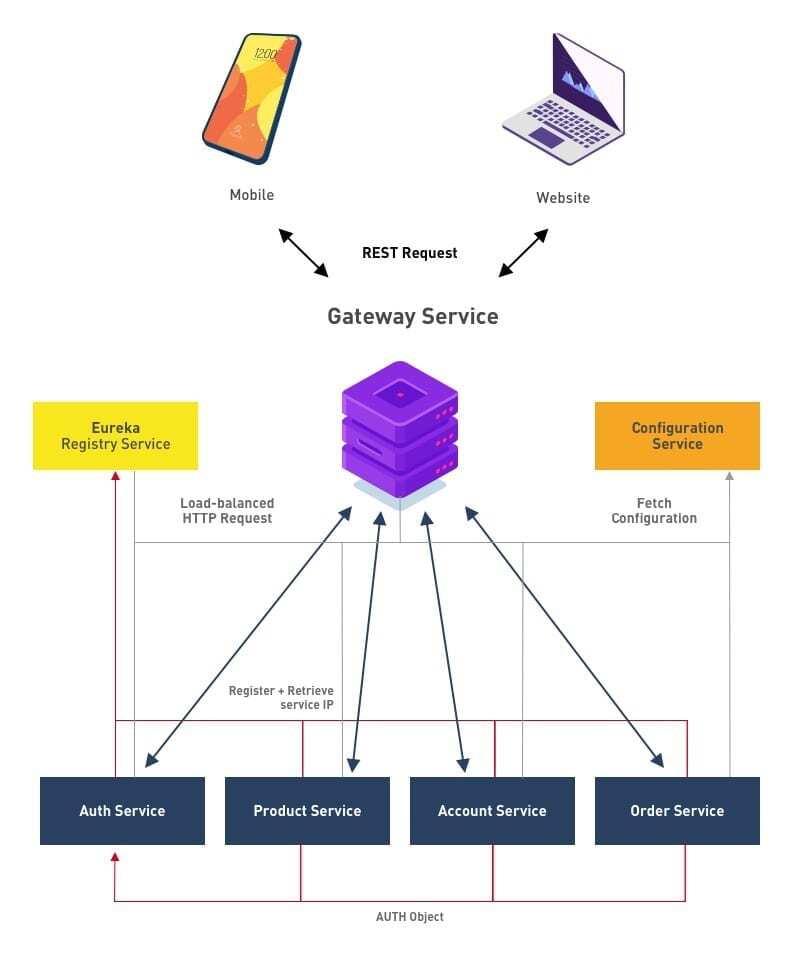
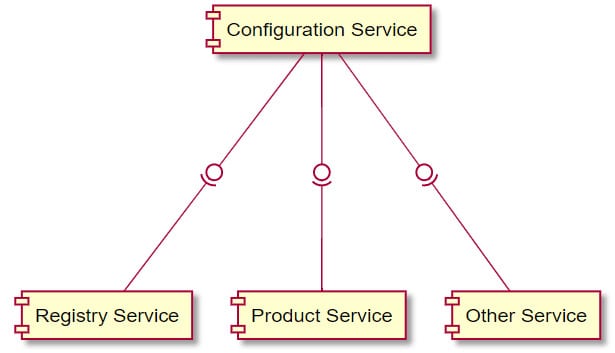
As described at previous article, we are migrating our monolithic service into microservice architecture, and we have created a schema on how we will do that. As a first step we will create our first non-functional service called the configuration service.

The Configuration service is a service use to externalise configuration in our microservice system. To implement the mechanism, we will use Spring Cloud Config because it provides server and client-side support for externalised configuration in a distributed system. All services in our microservice system can have their own configurations, such as:

  • Application configuration
  • Database configuration
  • Communication Channel Configuration – queues and other infrastructure
  • URLs of other microservices to talk to

The Configuration Service – what it is about?

The Configuration service is a service use to externalise configuration in our microservice system. To implement the mechanism, we will use Spring Cloud Config because it provides server and client-side support for externalised configuration in a distributed system. All services in our microservice system can have their own configurations, such as:

  • Application configuration
  • Database configuration
  • Communication Channel Configuration
  • queues and other infrastructure
  • URLs of other microservices to talk to

The Configuration Service – Why do we need that?

In my experience creating big monolithic services, I often experienced difficulties in maintaining a single configuration for a large application. Imagine if we needed to maintaining configurations for hundreds of microservices in different environments. That’s where a centralised configuration server steps in. The configurations for all microservices in all environments are stored at one place – a centralised configuration store. When a microservice needs its configuration, it calls the configuration service and the config server looks up the configuration and provides it to the microservice. The configurations are secured and have role–based access.

Project Layout

efore we get to how the microservice application will be created, lets take a look at how our project will be managed. Please note that, in this tutorial, we will be using IntelijIDE as our IDE and Apache Maven to manage the project.

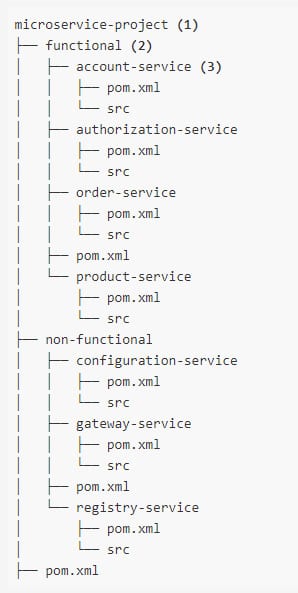
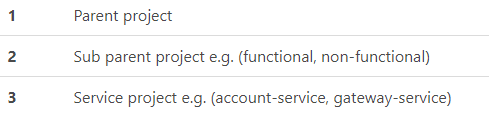
Apache Maven is used to manage the project. Because the project contains multiple services, it is wise to used Maven’s multi-modules feature to logically separate services from each other. This creates an explicit boundary between the modules (services) to avoid using components that belong to other services. It is good practice to implement encapsulation as early as possile, forcing the Separation of Concerns (SOC) principle in the project layout.

Parent Pom (Microservice Project)

Acts as a project aggregator and provides common dependencies across all modules.

microservice-project/pom.xml

<parent>
<groupId>org.springframework.bootgroupId>
<artifactId>spring-boot-starter-parentartifactId>
<version>2.1.0.RELEASEversion>
<relativePath/> 
parent><properties>
<spring-cloud.version>Greenwich.M3spring-cloud.version>
properties>
<dependencyManagement>
<dependencies>
<dependency>
<groupId>org.springframework.cloudgroupId>
<artifactId>spring-cloud-dependenciesartifactId>
<version>${spring-cloud.version}version>
<type>pomtype>
<scope>importscope>
dependency>
dependencies>
dependencyManagement>
<dependencies>
<dependency>
<groupId>org.projectlombokgroupId>
<artifactId>lombokartifactId>
dependency>
<dependency>
<groupId>org.springframework.cloudgroupId>
<artifactId>spring-cloud-starter-netflix-eureka-clientartifactId>
dependency>
<dependency>
<groupId>org.springframework.bootgroupId>
<artifactId>spring-boot-starter-actuatorartifactId>
dependency>
dependencies>

Sub-Parent Pom
Functional Parent Pom

All functional services will have their own database and use JPA technology to provide data operation. They will also provide a RESTful web services using spring-data-rest technology.

microservice-project/funtional/pom.xml

<dependencies>
<dependency>
<groupId>org.springframework.bootgroupId>
<artifactId>spring-boot-starter-data-restartifactId>
dependency>
<dependency>
<groupId>org.springframework.bootgroupId>
<artifactId>spring-boot-starter-data-jpaartifactId>
dependency>
<dependency>
<groupId>com.querydslgroupId>
<artifactId>querydsl-jpaartifactId>
dependency>
<dependency>
<groupId>org.hsqldbgroupId>
<artifactId>hsqldbartifactId>
dependency>
dependencies>

Non-Functional Parent Pom

No non-functional services provide features related directly with the business process, so no specific dependencies are defined in the pom file.

How to create the Configuration service?

We create a Maven project inside the non-functional module, and then add this to our pom:

<dependencies>
<dependency>
<groupId>org.springframework.cloudgroupId>
<artifactId>spring-cloud-config-serverartifactId>
dependency>
<dependency>
<groupId>org.springframework.cloudgroupId>
<artifactId>spring-cloud-starter-netflix-eureka-clientartifactId>
dependency>
<dependency>
<groupId>org.springframework.bootgroupId>
<artifactId>spring-boot-starter-actuatorartifactId>
dependency>
dependencies>
<build>
<plugins>
<plugin>
<groupId>org.springframework.bootgroupId>
<artifactId>spring-boot-maven-pluginartifactId>
plugin>
<plugin>
<groupId>com.spotifygroupId>
<artifactId>dockerfile-maven-pluginartifactId>
plugin>
plugins>
build>

Then in our resources folder we create application.yml and add this:

spring:
application:
name: configuration
profiles:
active:
– native # important for file system based configuration server
cloud:
config:
server:
native:
searchLocations: classpath:/config # location for client’s configuration files (service-name.yml)
# EUREKA DISCOVERY
eureka:
client:
healthcheck:
enabled: true
fetchRegistry: false # no need to resolve other services
register-with-eureka: false
serviceUrl:
defaultZone: http://localhost:9091/eureka # register this service with registry
instance:
instanceId: ${spring.application.name}:${spring.application.instance_id:${random.value}}
leaseRenewalIntervalInSeconds: 5 # DO NOT DO THIS IN PRODUCTION
# TOMCAT
server:
port: 9090
# ACTUATOR ENDPOINTS
management:
endpoints:
web:
exposure:
include:
– health
– info
– env

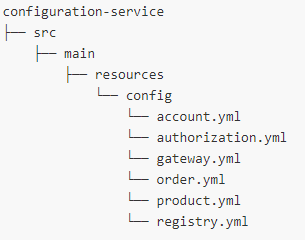
In this example, we store our config for other services in the config folder inside the resources folder. In real production cases, we may consider other alternatives such as Git, Vault, SVN or JDBC as the backend. One thing to note in this configuration is the location of the configuration files for other services described in spring.cloud.config.server.native.searchLocations property. The value is pointing to classpath inside config directory, therefore configuration files for other services should be place in that directory with the file name format service-name.[yml|properties]. Here is the project layout for the configuration-service:

Create Spring Boot Application

We create a normal Spring Boot application with @EnableConfigServer annotation added to enable the Spring Cloud Config Server.

@EnableConfigServer
@SpringBootApplication
public class ConfigurationMain {public static void main(String[] args) {
SpringApplication.run(ConfigurationMain.class, args);
}
}

Testing

To test the service, we build and run the project, then open the browser and access the following URL format [hostname]:[port]/[service-name]/[profile]:

  • [hostname] is the server name or ip address e.g. localhost, 127.0.0.1
  • [port] is the server port e.g. 9090
  • [service-name] is the configuration name.
  • [profile] is the profile name.

By default, the service will run using port number 9090. For example, to load the default configuration for product-service use this URL http://localhost:9090/product/default.

That concludes this part of our journey into microservice architecture. In the next part we will take a look at the Gateway service, and how it is used in our microservice architecture.

Author:

I Kadek Dendy Senapartha – Analyst Programmer Mitrais

Mitrais Staff and Management Provide Relief through #MitraisBerbagi

The COVID-19 pandemic is obviously having a devastating effect on communities around the world, and Indonesia is no different. According to recent Indonesian Government statistics, the worst-case outcomes might mean up to 3.78 million new poor, and up to 5.2 million additional unemployed throughout the nation.

While the government has instituted a social security program to assist those impacted, Mitrais staff have taken it upon themselves to initiate a complimentary program, Mitrais Berbagi (Berbagi roughly translates to Sharing in English).

Using donations from staff at our Bali, Bandung and Yogya offices, more than Rp80 million has already been collected. This has been used to create “Sembako”, relief packages containing staples such as rice, sugar, eggs, oil, canned foods, and noodles for distribution to needy families. Each package also includes fabric masks to help in the containment of the virus.

The first packages have already been delivered, and subsequent deliveries are planned to continue for as long as the pandemic continues.

As Ms Wiwie Harris, President Director of Mitrais said, “We are very proud to learn about the programs initiated by our staff to support the people within our community who are impacted by the COVID-19 pandemic. Adding value to the society is one of Mitrais’ key corporate values, so the Mitrais’ Board is very pleased to announce that Mitrais will make donations to match those made by our staff. We are hopeful that we can repeat this month’s donation in following months. Hand-in-hand, we can double the impact of the program and help even more people”.

One of our staff, Ayu, says “This month is a great time of self-reflection and being thankful for what we have in our life. We would like to help those who are less fortunate and, personally, I’m so happy that I can be part of this”.

Everyone at Mitrais is committed to helping our communities during this time of crisis, and Mitrais Berbagi is a great practical contribution to our countrymen.

DevOps – CI/CD with Github, Jenkins, and Amazon Web Services

DevOps has been the most discussed subject these days, especially in Continuous Integration/ Continuous Delivery (CI/CD). Therefore, CI/CD has been the main component of the software development cycle, with so many configurations and tools available. We will use Amazon Web Services (AWS) as the cloud platform, Github for the code repository, Jenkins for the Continuous Integration (CI), and AWS CodeDeploy service for the Continuous Delivery (CD).

Requirements:

  1. AWS account.
  2. Jenkins must be installed on local or on the AWS EC2 Instance (I will use Jenkins on EC2).
  3. Github account.

Follow the guide that AWS provided here to install the CodeDeploy Agent on EC2.

We need to create IAM roles in the first step. There are two types of IAM roles that are required: Service Role and Instance Role.   

  1. Service Role: Service Role access will be granted to AWS CodeDeploy to read through your EC2 instance tags. For auto-scaled instances, they will look for your autoscaling name tags. Follow the guide from AWS: https://docs.aws.amazon.com/codedeploy/latest/userguide/getting-started-create-service-role.html > Create a service role (console).  
  1. Instance Profile Role: EC2 instances need to be launched with proper permissions to access files from S3 buckets, so the Instance Profile Role will give access to EC2 samples to read code from S3 Buckets. Follow the guide from AWS: https://docs.aws.amazon.com/codedeploy/latest/userguide/getting-started-create-iam-instance-profile.html > Create an IAM instance profile for your Amazon EC2 instances (console).

Step 1: Setup AWS EC2 Instance

Create AWS EC2 instance (Amazon Linux virtual machine) that will feature different AWS services to support the application (I use Redhat 8 as the Operating Systems). Follow the guide from AWS: https://docs.aws.amazon.com/codedeploy/latest/userguide/instances-ec2-create.html   

Note: use the Instance Profile Role created above for the IAM roles.  

Step 2: Install CodeDeploy Agent on EC2

The instance we have created must have a CodeDeploy agent installed on it to proceed to the code deployment on the sample. Follow the guide from AWS: https://docs.aws.amazon.com/codedeploy/latest/userguide/codedeploy-agent-operations-install-linux.html

Step 3: Create an S3 Bucket for the Application Code

The application codes should be uploaded to a location where CodeDeploy can deploy it. In this case, the AWS S3 bucket is used. Follow the guide from AWS to create an S3 bucket: https://docs.aws.amazon.com/AmazonS3/latest/gsg/CreatingABucket.html

Step 4: Configure AWS CodeDeploy Service

We need the following requirements to use the AWS CodeDeploy service:  

  1. An application
  2. A Deployment Group

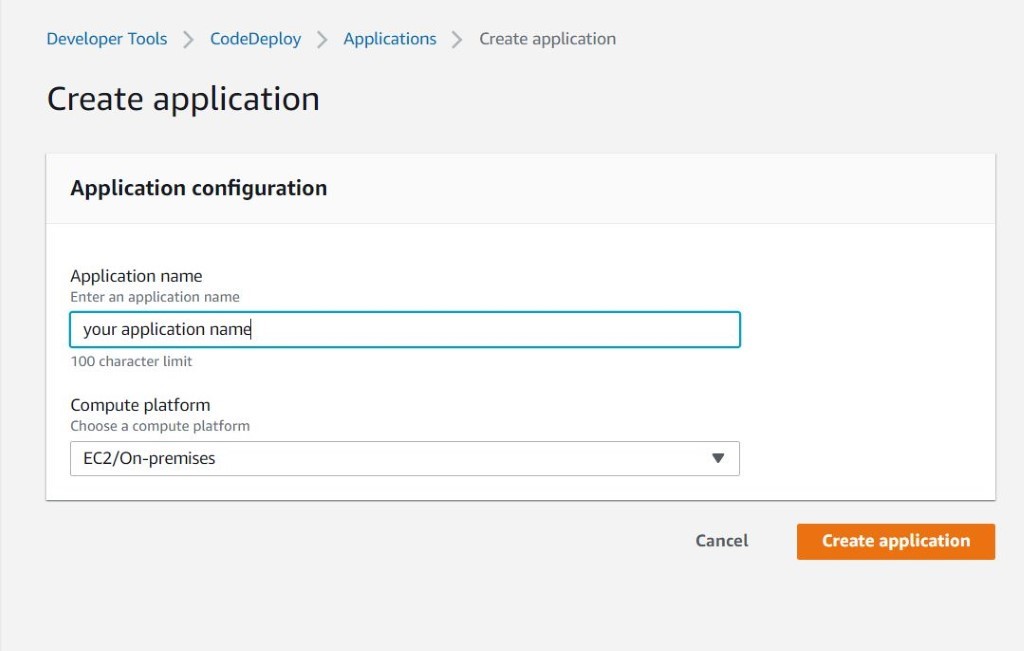
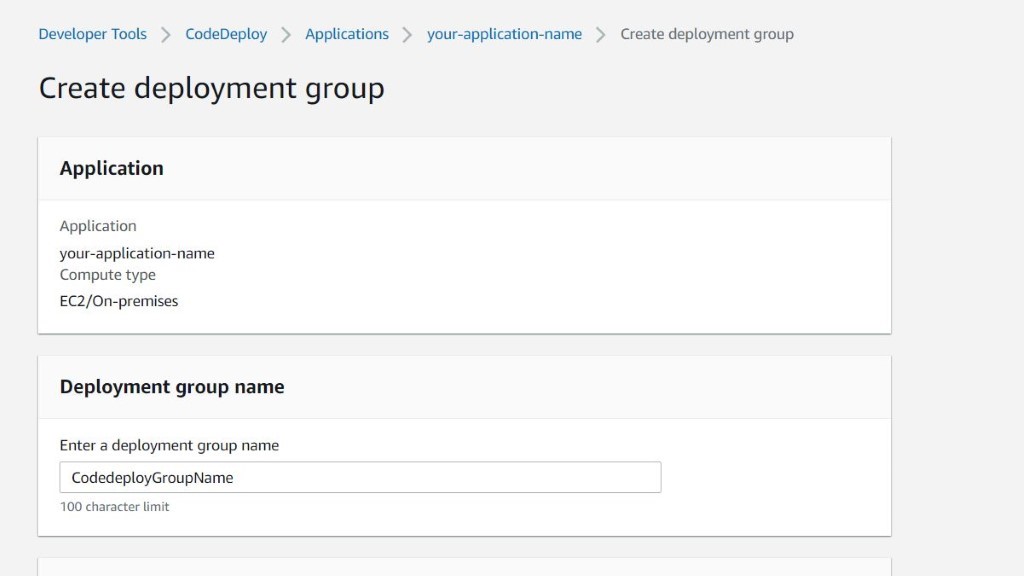
The next step is to create an Application on AWS, which will hold the demo application and the Deployment Group.

1. Create an application.

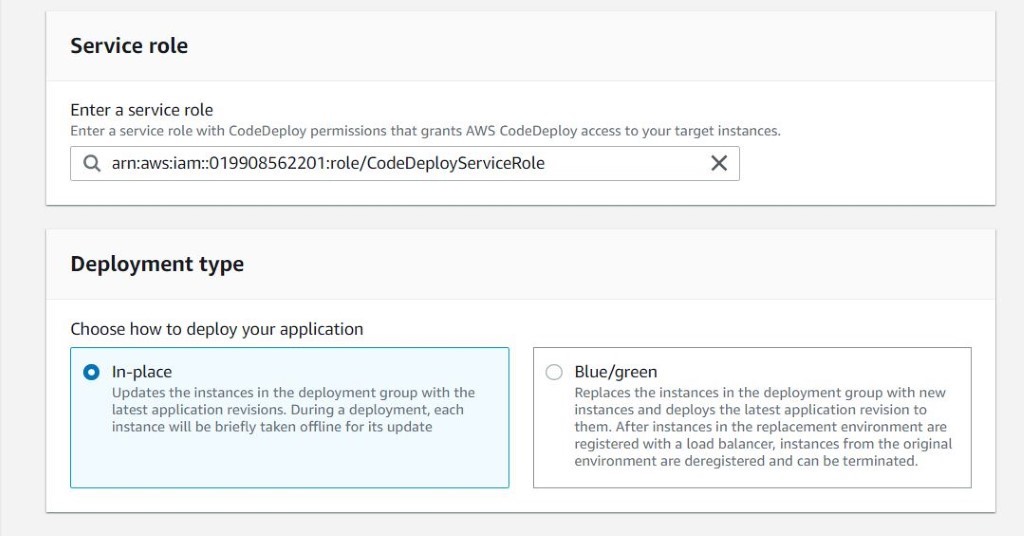
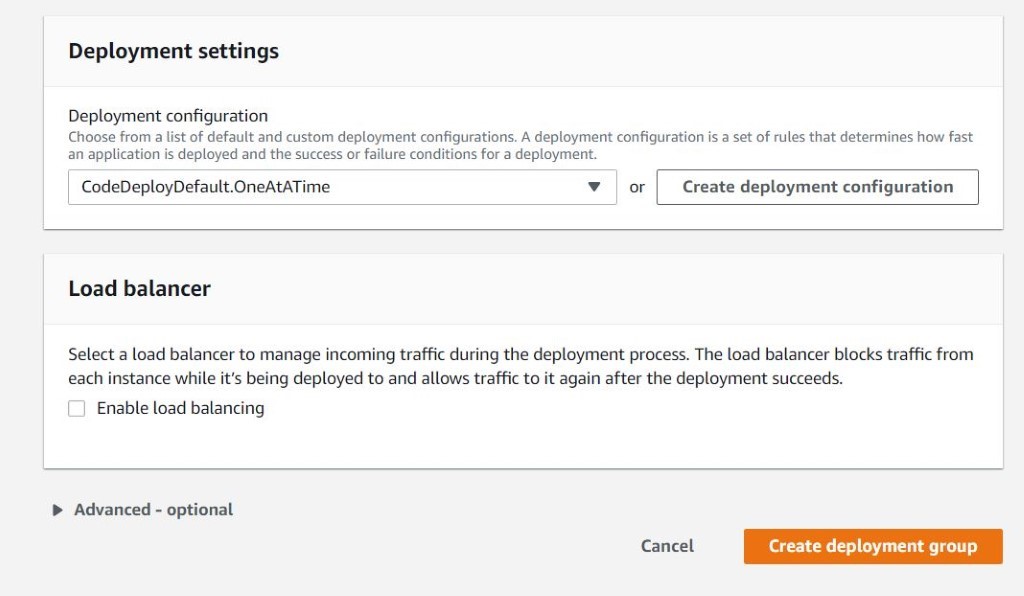
2. Create the deployment group.

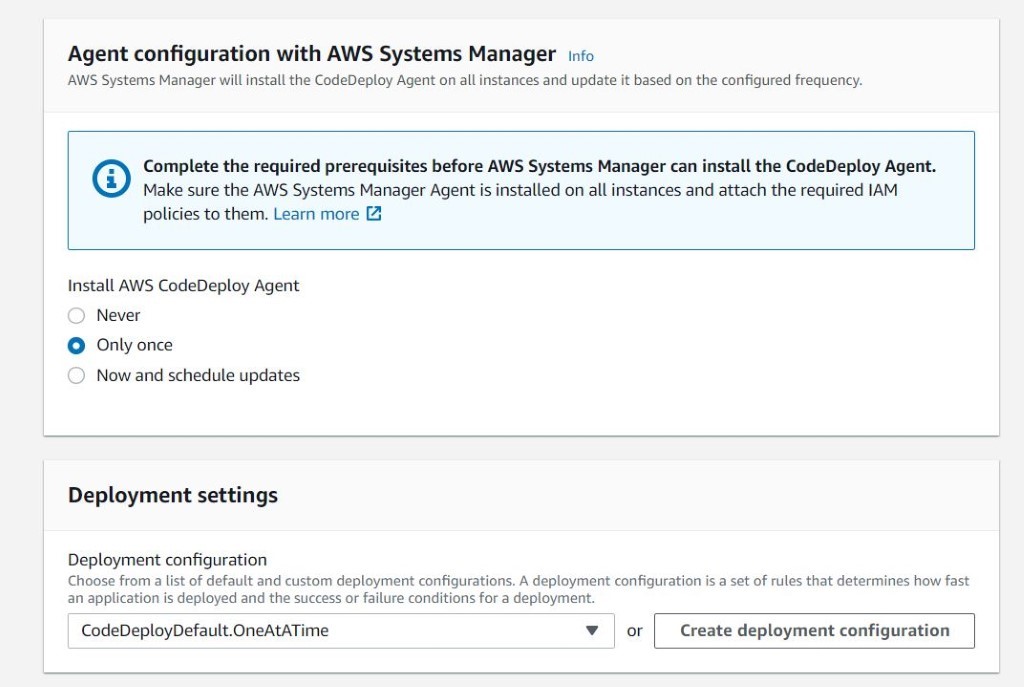
3. Select the created service role.

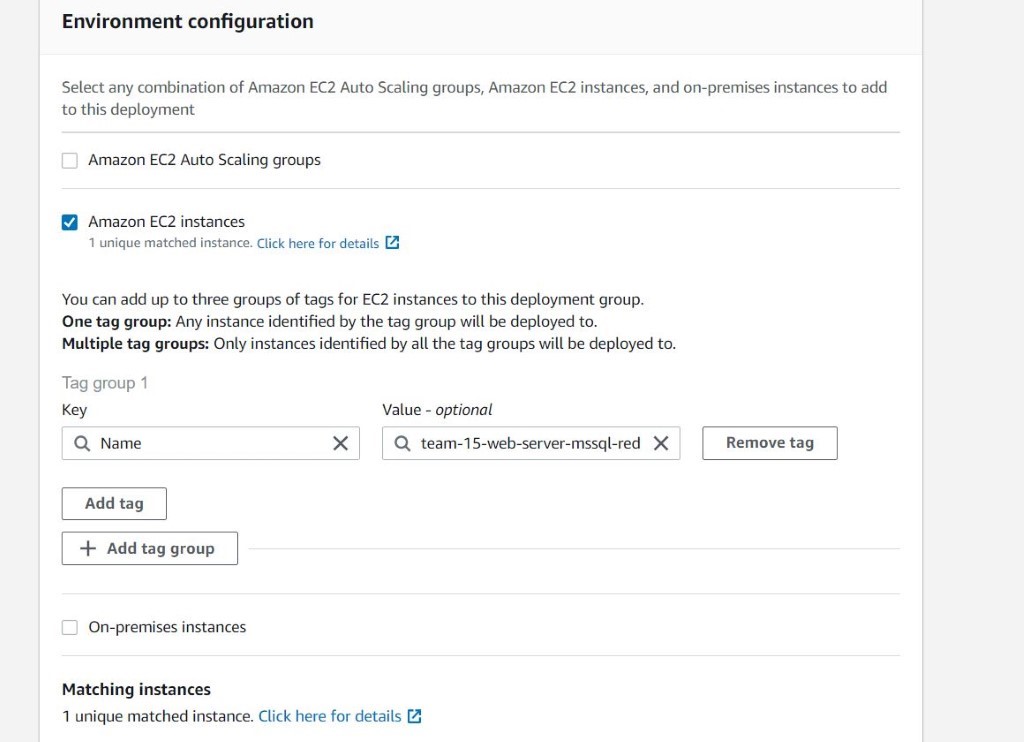
4. Select the EC2 instance name and ensure there is a matched instance.

5. Select OneAtATime for deployment settings. This one is optional if we have configured the AWS CodeDeploy Agent manually.

6. Create the deployment group.

Step 5: Configure Github

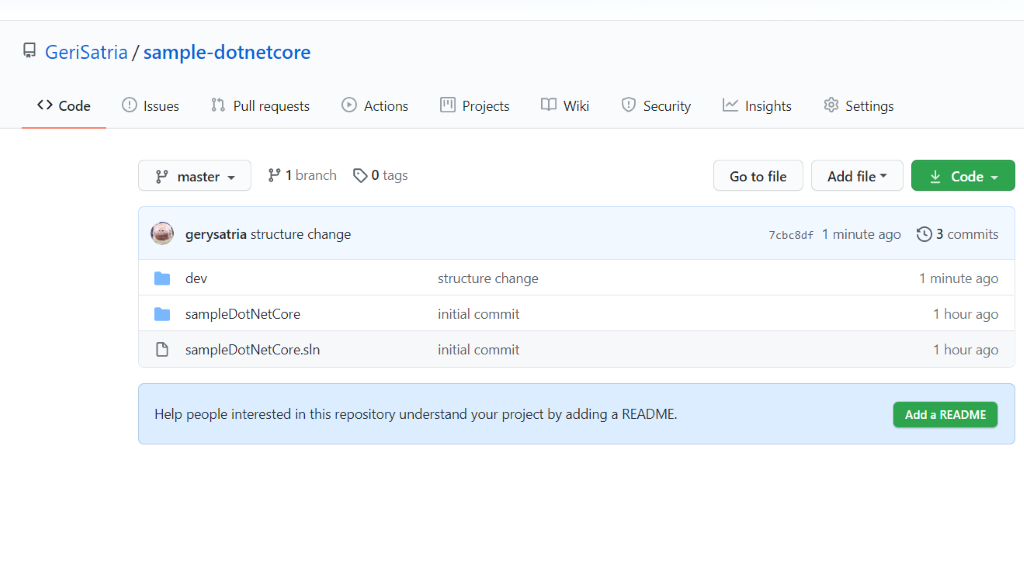
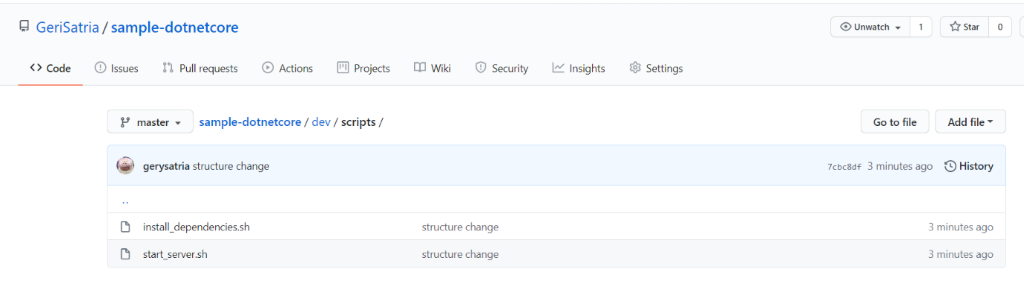
We are using. NetCore web API as a sample code here with the following structure having the publish output under the “Dev” folder.

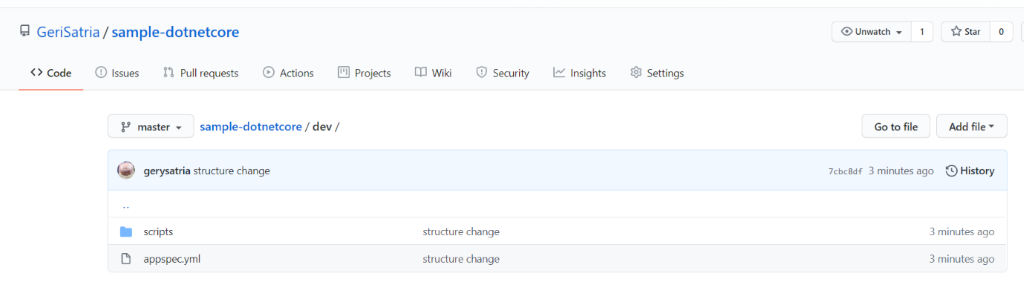
Add appspec.yml and scripts under the dev with the following:

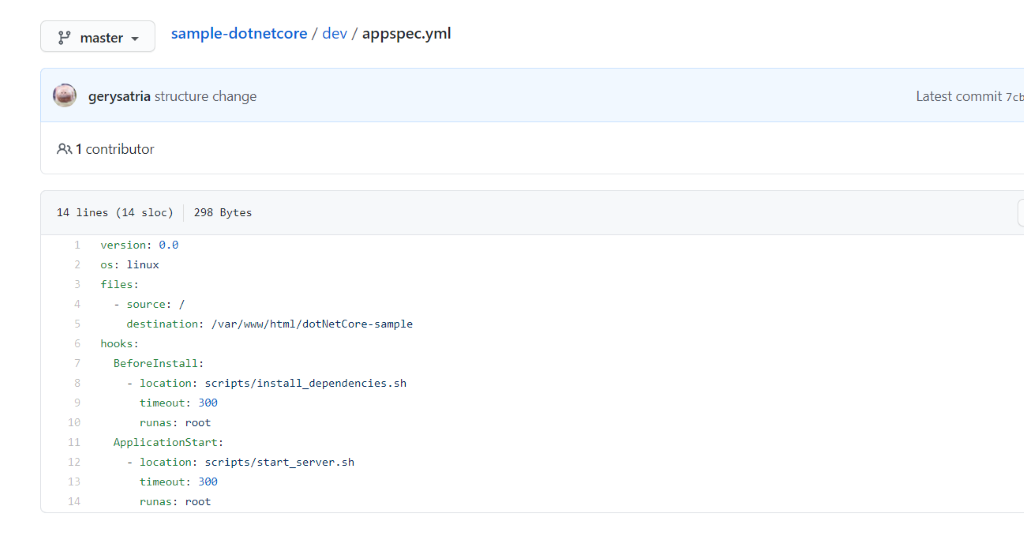
Under the appspec.yml file, write the following:

appspec.yml: The application specification file (AppSpec file) is a YAML-formatted or JSON-formatted file used by AWS Codedeploy to manage deployment. 

In the above YAML file, the source is the root (/) because the appspec.yml is located under the dev folder, and the result of .Net Publish will be under the dev folder also.

Step 6: Configure Github hook with Jenkins

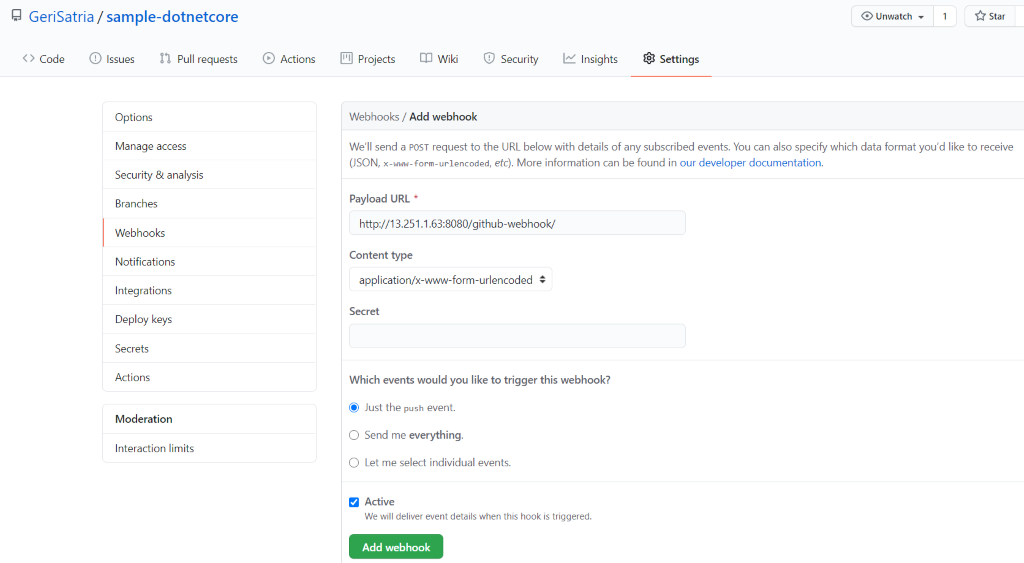
We will set up the Github to trigger Jenkins when the push event happens. We need to create a webhook to trigger Jenkins.

URL format: http://jenkinsserverip:8080/github-webhook/

Step 7: Configure Jenkins with AWS CodeDeploy plugin

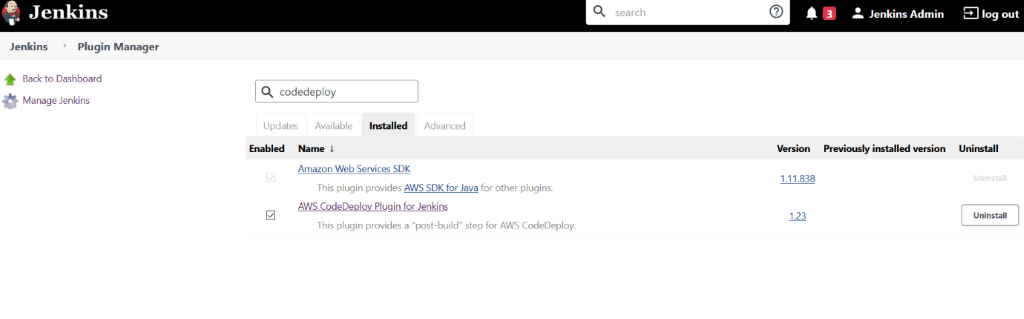
1. Ensure the AWS CodeDeploy plugin is installed in Jenkins

Also, ensure the Jenkins Server has .Net Core SDK, installed.

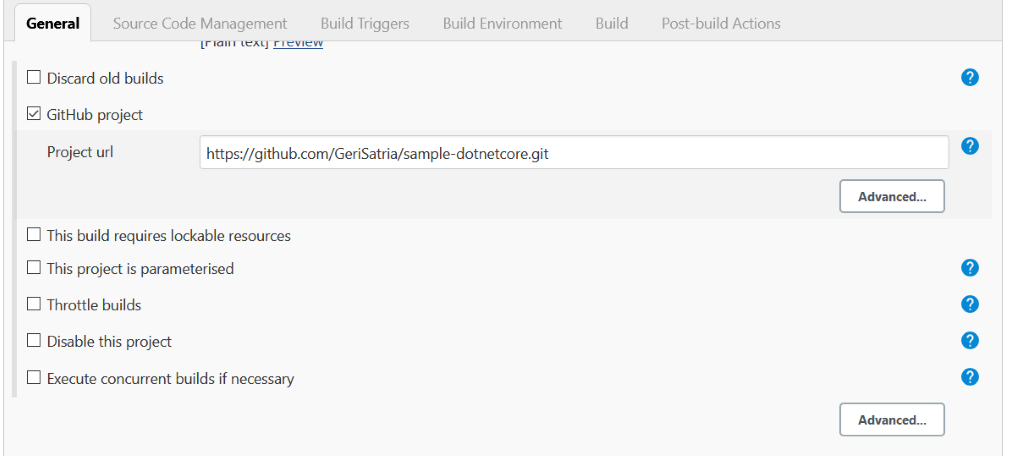
2. Create a new FreeStyle job with the following configurations

General: Check and enter the GitHub project repository link

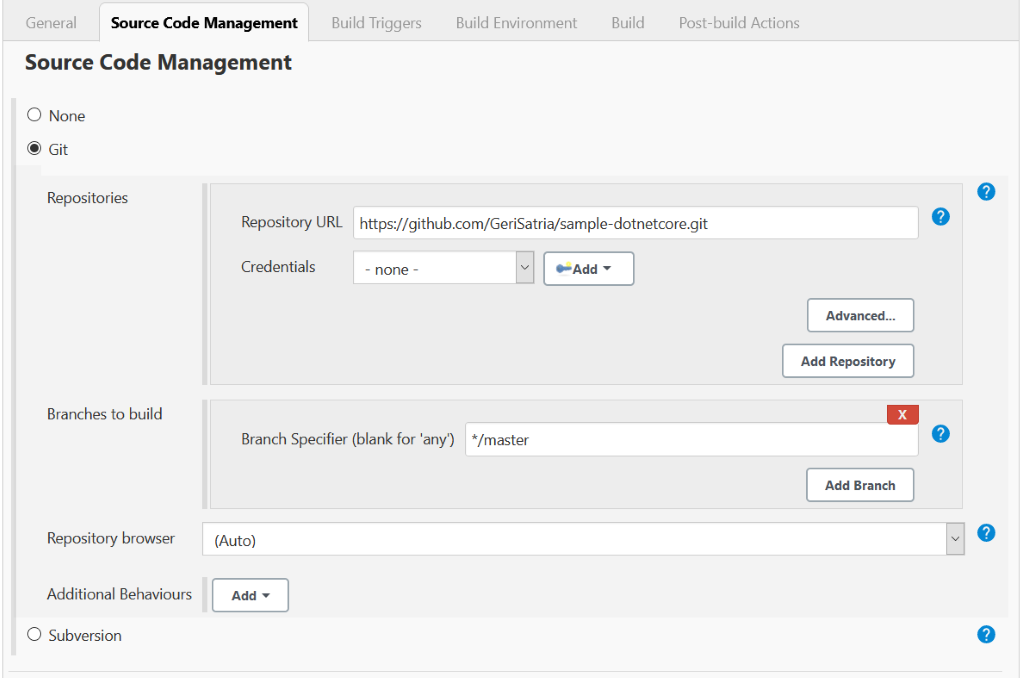
SCM: Select Git and enter the repository URL

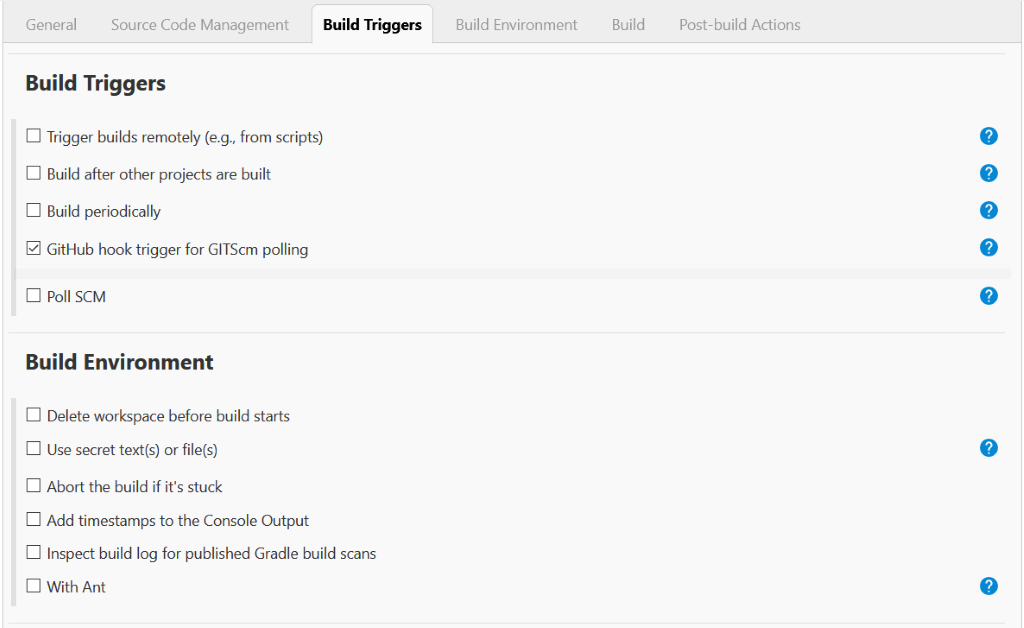
Build Triggers: Check the GitHub hook a trigger to make the project run with automation when there is a push event to the repository.

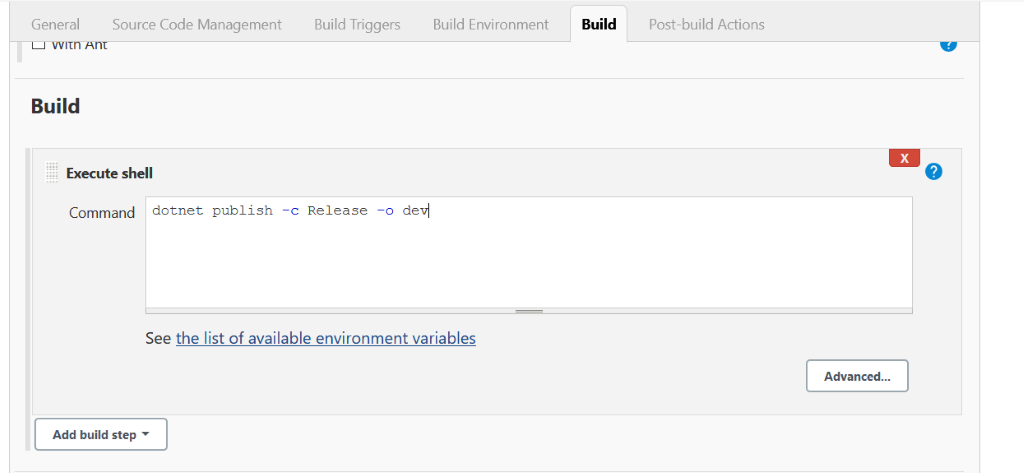
Build: Publish and put the published code under the dev folder

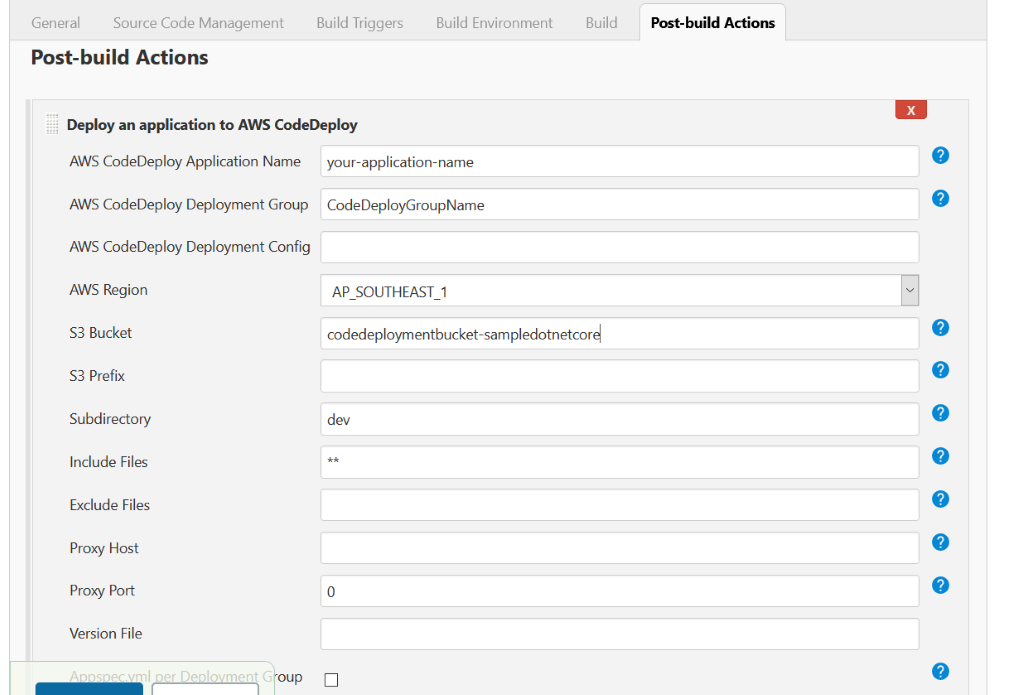
Post-build Actions: Enter the CodeDeploy settings that we have configured previously to the Jenkins

Now, we are all set to see the result here. As we make some changes in the code that will trigger Jenkins jobs to build automatically, the AWS CodeDeploy will start deploying the code when Jenkins successfully builds the project. The result will be deployed under the destination server instance that we have configured before.

As the server that I am using is Linux, we need to create the service file for the API project that we have deployed. We can follow the Microsoft documentation for deploying .Net Core on Linux here https://docs.microsoft.com/en-us/aspnet/core/host-and-deploy/linux-nginx?view=aspnetcore-3.1.

Author:
I Gusti Fauzi Geri Satria – Analyst Programmer